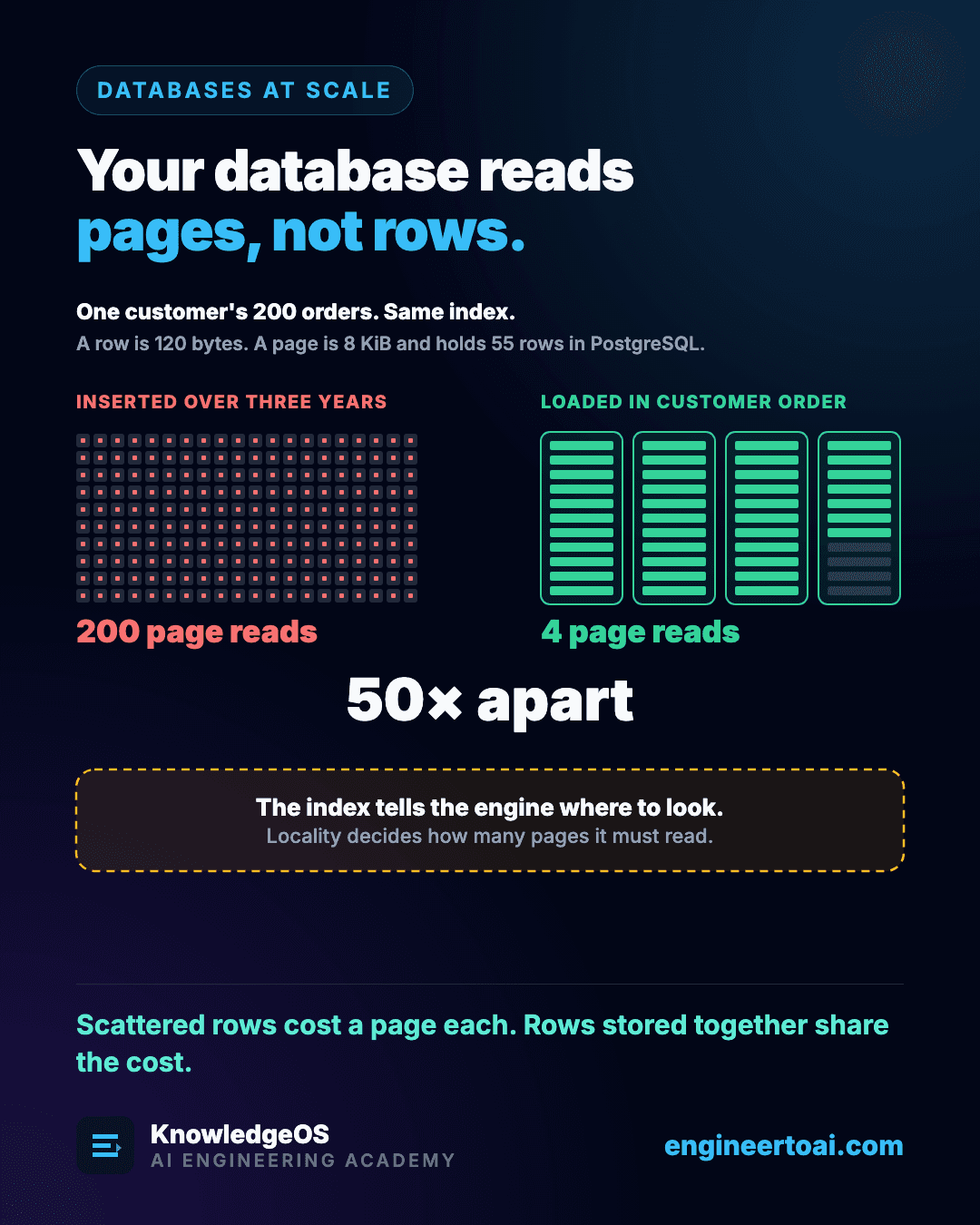
You ask for one 120-byte row. The storage engine reads an 8 KiB page, because that is the smallest unit the disk and the buffer pool exchange. If your row sits alone on that page, you paid 8 KiB for 120 bytes. If the neighbours you also wanted are on it too, you paid 8 KiB for all of them.
That ratio is locality, and it is the most useful single lens for reasoning about storage performance.
How many rows share a page
With nothing else taking space, an 8 KiB page would hold 68 rows of 120 bytes. A PostgreSQL heap page also spends 24 bytes on its page header and, for every row, 4 bytes on a line pointer and 24 on a tuple header (23 bytes, padded), so it holds 55.
page_bytes, row_bytes = 8 * 1024, 120
ideal = page_bytes // row_bytes                       # 68 rows
postgres = (page_bytes - 24) // (4 + 24 + row_bytes)  # 55 rows
Same index, fifty times apart
Two tables hold the same customer's 200 orders, and the same index finds them in both. In the first, the orders were inserted over three years, so they are scattered across about 200 pages written at different times. The second was bulk-loaded in customer order last night, so the 200 rows sit side by side.
| How the rows are stored | Page reads for 200 rows |
|---|---|
| Scattered | 200 |
| Clustered, 68 rows a page | 3 |
| Clustered, PostgreSQL's 55 rows a page | 4 |
The index tells the engine where to look. It does not reduce the number of pages the engine must fetch; locality does. That is how "the query returns 200 rows and takes 400 ms" happens with a perfectly good index.
Most pages never touch the disk
Pages are usually served from the buffer pool, the memory the engine keeps for hot pages, where a hit costs a memory access instead of an I/O. A hit ratio above 99% is normal on a well-sized database, which makes the ratio a poor alarm: a table scan that evicts the working set can keep it high while ruining every other query's locality. What matters is not how often you hit, but what was evicted to make room.
Think Like an Engineer
A database with 64 GiB of RAM and a 60 GiB working set can be an order of magnitude faster than the same database with a 70 GiB working set. With uniform access there is no gradual decline, because the set either fits or it does not. Skewed access softens the cliff: the hot part of a 70 GiB set may still fit.
When a query is slow despite a good index, count pages, not rows.