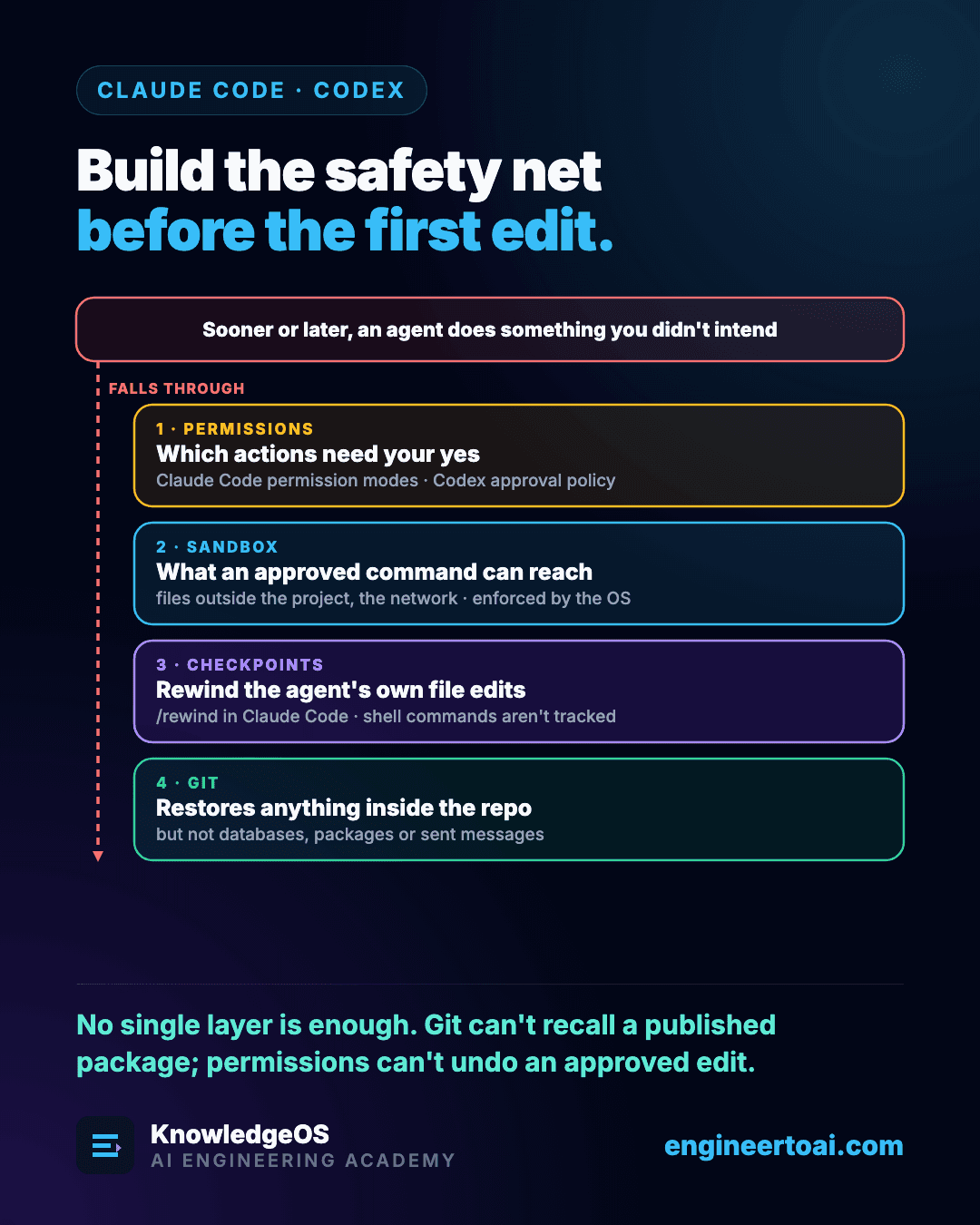
Sooner or later a coding agent will do something you did not ask for. It will edit a file you never mentioned, run a command that changes more than it should, or make a failing test pass by weakening the test. Better instructions make that rarer. They never make it impossible.
What you can control is the damage: how much an unwanted action can touch, and how fast you can undo it. That is a setup task, not a prompting skill, and you do it once per project.
Four layers, each covering the last one's blind spot
1. Permissions decide which actions need your yes. Claude Code calls them permission modes and rules; Codex calls it the approval policy. In a codebase you do not know yet, choose a mode that asks before it edits, so you can see which files the agent reads and which commands it reaches for. The fully automatic modes are useful later, once you trust the project's setup.
2. The sandbox decides what an approved command can reach. Files outside the project and the network are the usual boundaries, and the operating system enforces them. That matters because the model can be wrong about what a command does: inside Codex's workspace-write sandbox, a write inside the project folder succeeds, while a write to your home folder and a request to the npm registry both fail.
3. Checkpoints rewind the agent's own edits. Claude Code saves one with every prompt, and /rewind restores the code, the conversation or both. It undoes a wrong direction in seconds, with one large exception below.
4. Git restores anything inside the repository, including what shell commands changed. It restores nothing outside it: not a database, not an installed package, not a message that was sent.
No layer is enough alone. Git cannot recall a published package, and permissions cannot undo an edit you approved.
Git first: one branch and a clean tree per task
Start every task from a clean working tree on its own branch. Then "what did the agent change?" always has an exact answer, and abandoning an attempt costs nothing.
git status                     # must say "nothing to commit"
git switch -c tb-101-overdue   # one branch per task
# ... the agent works ...
git diff --stat                # which files changed, and how much
git diff                       # every changed line
git stash -u                   # set an attempt aside, untracked files included
Commit whenever the tests pass, even halfway through a task. Small commits turn a bad turn into a few minutes of work instead of an afternoon, and they let you show the agent exactly which change broke something.
Common Mistake
Trusting the working tree after a rewind. Checkpoints track only the edits Claude Code makes with its file tools. A file moved with mv, deleted with rm, regenerated by a script or changed by a database migration stays changed. After any rewind, run git status and git diff to see what is really there.
The settings to leave alone
Both tools have a mode that removes every boundary at once. They exist for containers and virtual machines that are already isolated, not for your laptop. When a task needs one extra capability, such as network access to install a package, grant that one thing for that session, or run the install yourself and let the agent continue.